[closed] Ticket - timstamp does not show...

SUPPORTER
Posts: 2121
Joined: Sep 27, 2014
.... when opening the track from the track list in profile or news. Only when you click the track number itself does it show.
Also, and this is an old one, it will only make one time stamp "life" the rest are just text.
Chrome/Win 10
Also, and this is an old one, it will only make one time stamp "life" the rest are just text.
Chrome/Win 10

SUPPORTER
Posts: 2953
Joined: Dec 30, 2010
could you please make a screenshot of the "timestamp" you are talking about? I'm not sure I'm seeing / getting it so far.
Are the flop-down player boxes not opening as expected on clicking the play buttn on the left hand side of your newsfeed items? please enlighten me sometime :)
Are the flop-down player boxes not opening as expected on clicking the play buttn on the left hand side of your newsfeed items? please enlighten me sometime :)
the t.bone Ovid System CC 100
Condenser Clip Microphone for Ovid System

$45
iThis widget links to Thomann, our affiliate partner. We may receive a commission when you purchase a product there.
Visit Shop
SUPPORTER
Posts: 2121
Joined: Sep 27, 2014
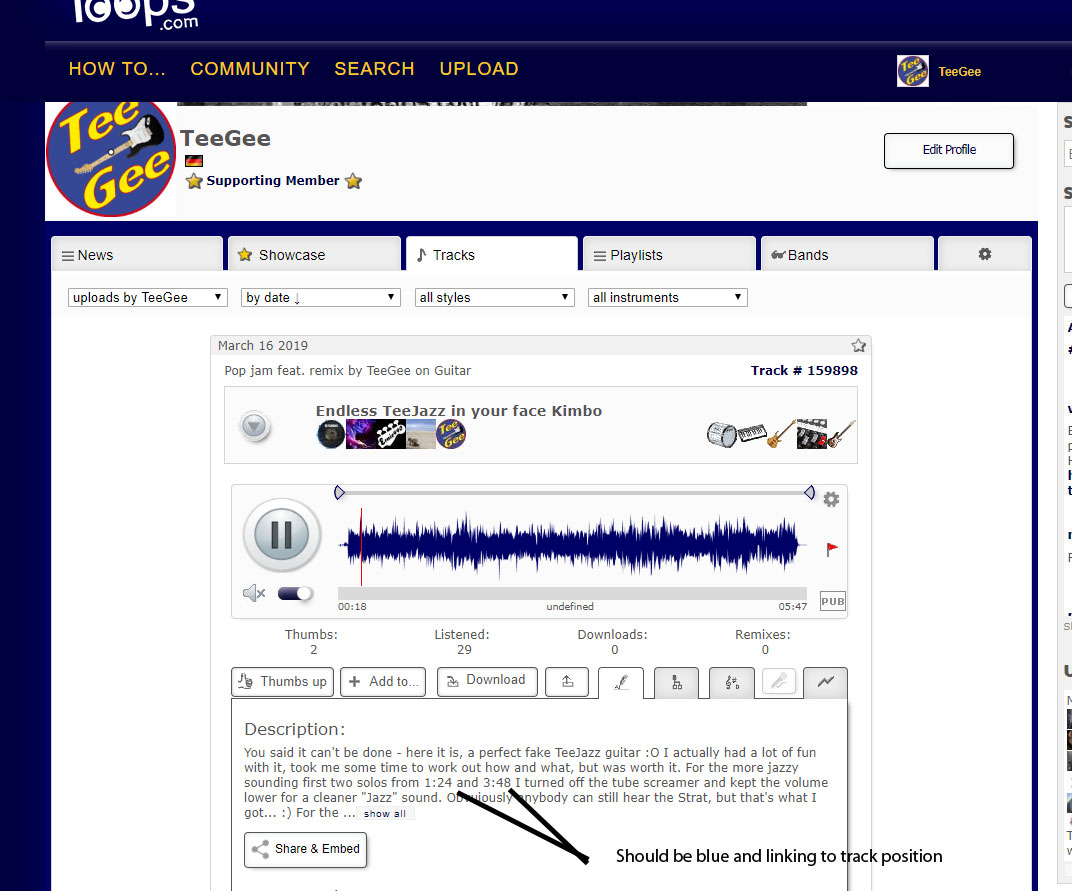
Oh dear I probably used the wrong term :O see screenshot, that explains it :)
TeeGee attached the following image:
TeeGee attached the following image:
SUPPORTER
Posts: 2953
Joined: Dec 30, 2010
ahhh! :) now I gotcha... there are timestamps all over the place, and i hadn't thought of those, rather thought you might hint at comment datestamps, upload datestamps or current-playing-time (where the "undefined" still needs to go away, btw).
You are correct, these need fixing! oh, and a name, too.
I'd call them track-timestamp-bbcodes since they are handled along with parsing smilies and stuff, but you had no chance of guessing that ;)
You are correct, these need fixing! oh, and a name, too.
I'd call them track-timestamp-bbcodes since they are handled along with parsing smilies and stuff, but you had no chance of guessing that ;)
+1
SUPPORTER
Posts: 2953
Joined: Dec 30, 2010
found & fixed the issue, and also fixed the odd fact that only the first of the two timestamps on your screenshot was turned into a link, stupid little bug there, too, glad you had me look into that!
+1
SUPPORTER
Posts: 2121
Joined: Sep 27, 2014
Actually I think this is something that did not work on the old version too, now it's perfect :) :W
wikiloops online jamsessions are brought to you with friendly
support by:
When I first seen this site I just could not believe the things you could do with other musicians, gone from strength to strength and its all dong to everyone as great musicians, long may it continue.
tron12